Arm Pain Rehab Challenge · 23
Forearm pain from typing and mouse use: posture, load and breaks
Work-related upper limb musculoskeletal disorders in computer users: pain or discomfort in the forearm, wrist and hand (often with neck/shoulder…
Key points
- Set up. Raise the screen, support the forearms and keep wrists near straight while typing and mousing.
- Break. Add short supplementary breaks; they reduced neck discomfort in two trials.
- Vary. Alternate tasks and postures; consider arm support with an alternative mouse for neck and shoulder symptoms.
What it is
Work-related upper limb musculoskeletal disorders in computer users: pain or discomfort in the forearm, wrist and hand (often with neck/shoulder symptoms) associated with sustained keyboard and mouse work, static postures and limited recovery breaks. Associations are with exposure; single causes are not established.
How we analysed the movement
Three movements relevant to this topic were analysed from illustrated reference figures. Joint centres were located with two-dimensional pose estimation where the whole arm was visible; elbow and wrist angles, and the directions of external load and tendon pull, were then drawn on the figure; on hand close-ups, where pose estimation does not apply, the landmarks were placed manually. The figures are educational estimates that show how position changes mechanical demand; they are not measurements of a patient. Every research value quoted below comes from the published source cited beside it.
Movement A: Laptop typing (side view)
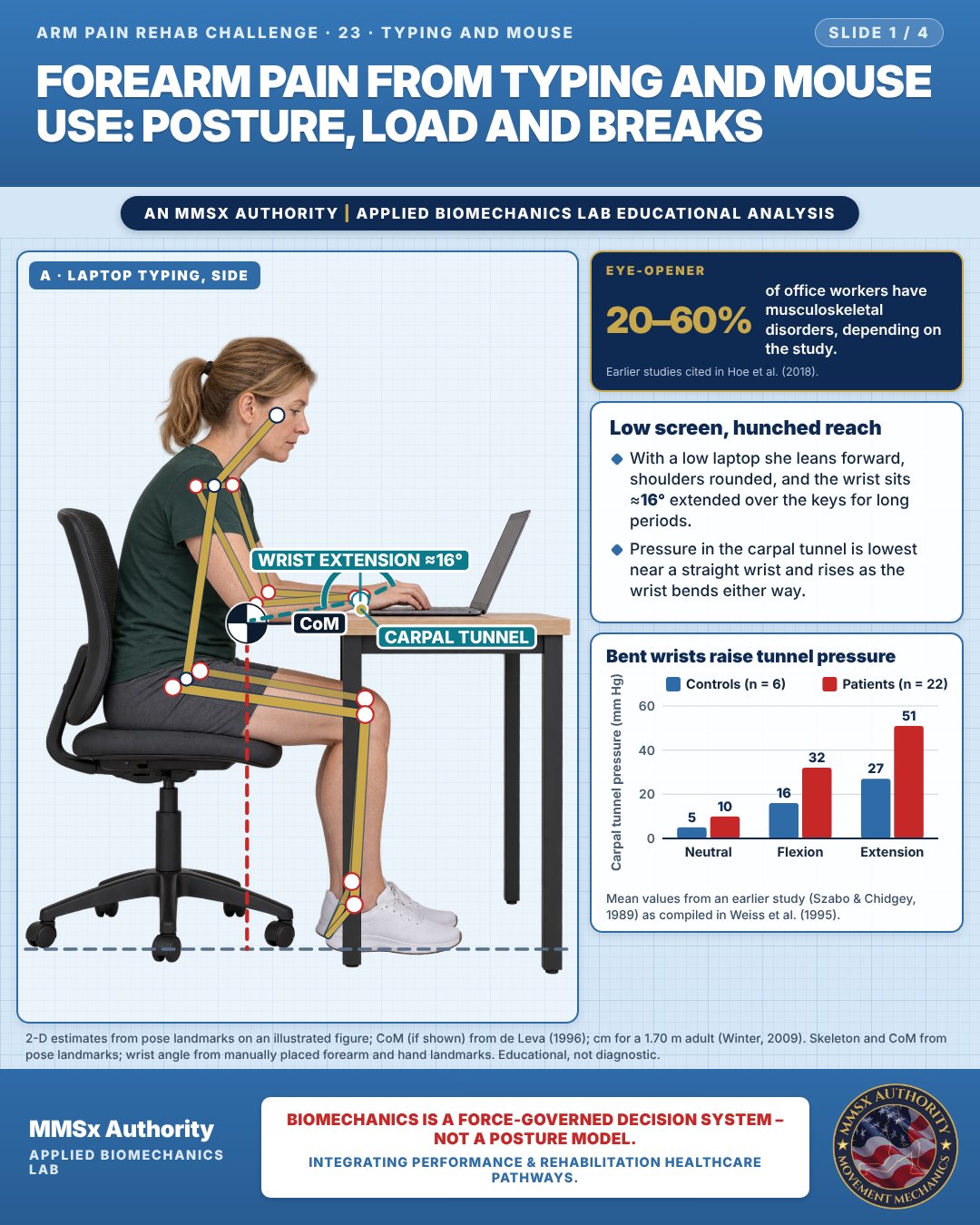
Low screen, hunched reach
With a low laptop she leans forward, shoulders rounded, and the wrist sits ≈16° extended over the keys for long periods.
Pressure in the carpal tunnel is lowest near a straight wrist and rises as the wrist bends either way.
Bent wrists raise tunnel pressure
Movement B: Standing desk (side view)
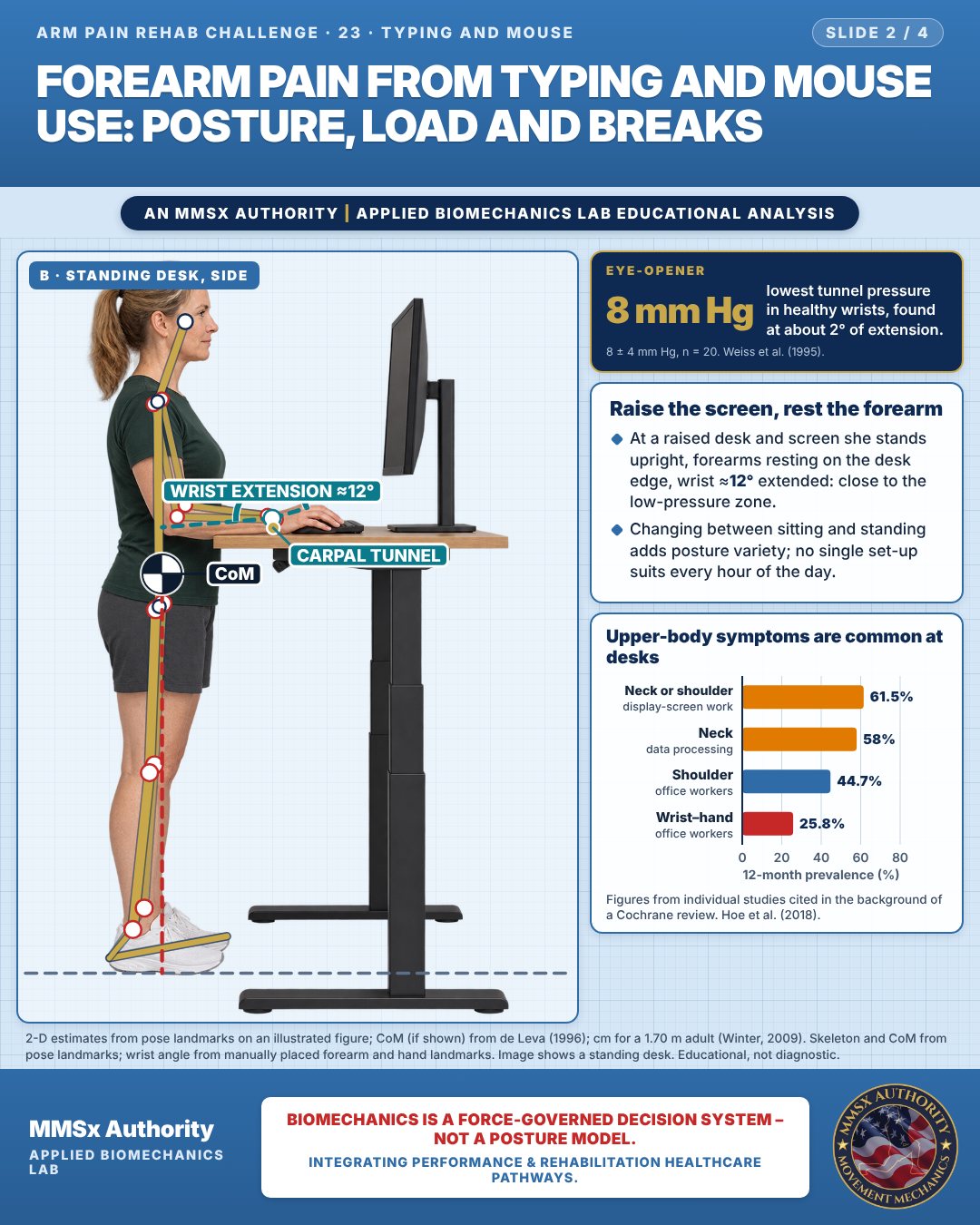
Raise the screen, rest the forearm
At a raised desk and screen she stands upright, forearms resting on the desk edge, wrist ≈12° extended: close to the low-pressure zone.
Changing between sitting and standing adds posture variety; no single set-up suits every hour of the day.
Upper-body symptoms are common at desks
Movement C: Hand on mouse, top
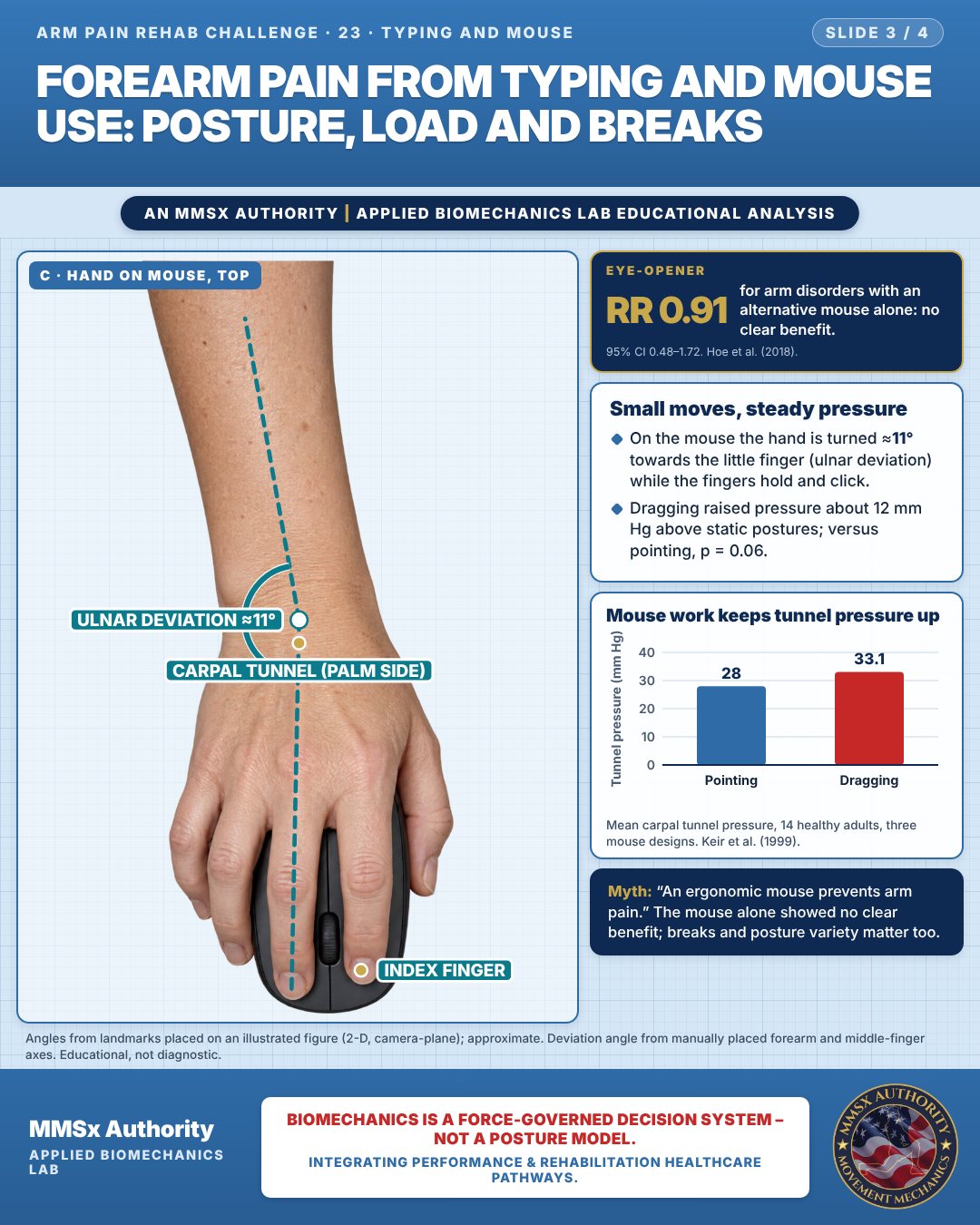
Small moves, steady pressure
On the mouse the hand is turned ≈11° towards the little finger (ulnar deviation) while the fingers hold and click.
Dragging raised pressure about 12 mm Hg above static postures; versus pointing, p = 0.06.
Mouse work keeps tunnel pressure up
Decision pathway
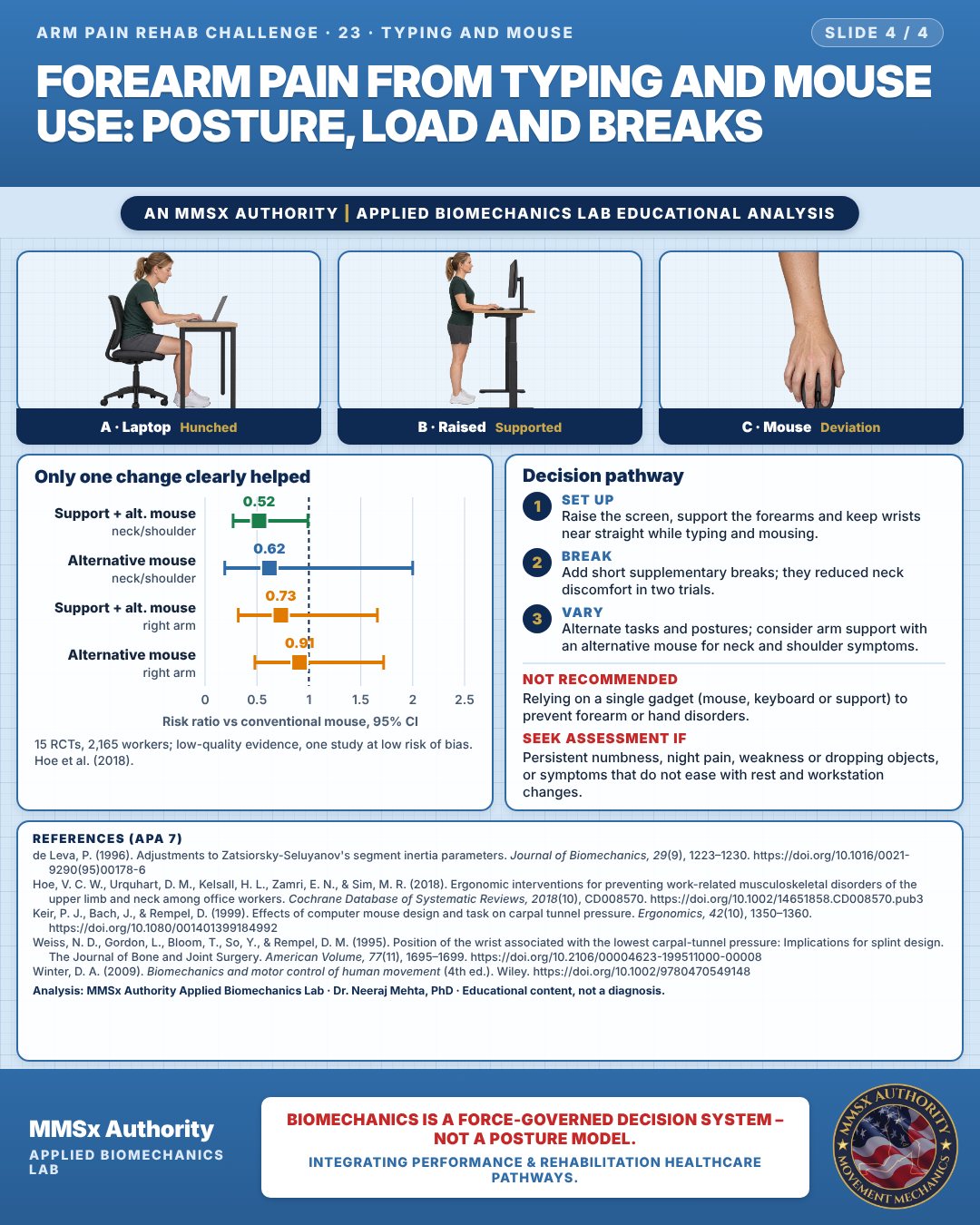
Only one change clearly helped
Set up
Raise the screen, support the forearms and keep wrists near straight while typing and mousing.
Break
Add short supplementary breaks; they reduced neck discomfort in two trials.
Vary
Alternate tasks and postures; consider arm support with an alternative mouse for neck and shoulder symptoms.
What the evidence supports
- Low-quality evidence that arm support combined with an alternative mouse reduces neck/shoulder disorders; no clear effect on right upper limb disorders from mouse or arm support changes alone; supplementary breaks reduce neck discomfort. Mechanically, keeping the wrist near neutral keeps carpal tunnel pressure near its minimum (Weiss et al., 1995).
Myth and evidence
Myth“An ergonomic mouse prevents arm pain.”
EvidenceAlternative mouse alone: RR 0.91 (95% CI 0.48–1.72) for right upper limb disorders — no clear benefit (Hoe et al., 2018). Posture variety and breaks matter as much as equipment.
Cautions
Not recommended
Relying on a single gadget (mouse, keyboard or support) to prevent forearm or hand disorders.
Seek assessment if
Persistent numbness, night pain, weakness or dropping objects, or symptoms that do not ease with rest and workstation changes.
Methods note
2-D estimates from pose landmarks on an illustrated figure; CoM (if shown) from de Leva (1996); cm for a 1.70 m adult (Winter, 2009). Skeleton and CoM from pose landmarks; wrist angle from manually placed forearm and hand landmarks. Image shows a standing desk. Angles from landmarks placed on an illustrated figure (2-D, camera-plane); approximate. Deviation angle from manually placed forearm and middle-finger axes. These are educational estimates, not a diagnosis.
References
- de Leva, P. (1996). Adjustments to Zatsiorsky-Seluyanov's segment inertia parameters. Journal of Biomechanics, 29(9), 1223–1230. https://doi.org/10.1016/0021-9290(95)00178-6
- Hoe, V. C. W., Urquhart, D. M., Kelsall, H. L., Zamri, E. N., & Sim, M. R. (2018). Ergonomic interventions for preventing work-related musculoskeletal disorders of the upper limb and neck among office workers. Cochrane Database of Systematic Reviews, 2018(10), CD008570. https://doi.org/10.1002/14651858.CD008570.pub3
- Keir, P. J., Bach, J., & Rempel, D. (1999). Effects of computer mouse design and task on carpal tunnel pressure. Ergonomics, 42(10), 1350–1360. https://doi.org/10.1080/001401399184992
- Weiss, N. D., Gordon, L., Bloom, T., So, Y., & Rempel, D. M. (1995). Position of the wrist associated with the lowest carpal-tunnel pressure: Implications for splint design. The Journal of Bone and Joint Surgery. American Volume, 77(11), 1695–1699. https://doi.org/10.2106/00004623-199511000-00008
- Winter, D. A. (2009). Biomechanics and motor control of human movement (4th ed.). Wiley. https://doi.org/10.1002/9780470549148
Cite this article
Mehta, N. (2026, October 28). Forearm pain from typing and mouse use: posture, load and breaks. MMSx Authority Applied Biomechanics Lab. https://mmsxauthority.org/edu/analysis/arm/23-forearm-pain-from-typing-and-mouse-use-posture-load-and-breaks/
Part of the collection
Mehta, N. (2026). Elbow, Forearm, Wrist and Hand Rehabilitation: 50 Evidence-Based Biomechanics Analyses [Collection]. MMSx Authority Applied Biomechanics Lab. Zenodo. https://doi.org/10.5281/zenodo.23735910
All Arm Pain Rehab Challenge articles · Rehabilitation Library