Part II · SCREEN MECHANICS AND UPPER-BODY PAIN
Wrist, Elbow and Hand Strain in Desk Work
The hands perform the finest, most repeated work of the desk day — thousands of keystrokes and clicks, hour after hour. The discomfort that can follow is widely and wrongly blamed on ‘typing causing carpal tunnel’ (Werner & Andary, 2002). The real account is about wrist posture, repetitive low load, nerve mobility and the whole arm chain.
6.1 Small Parts, Long Hours
The wrist and hand are marvels of fine engineering: a dense assembly of small bones, joints, tendons and nerves capable of extraordinary precision. Desk work asks them to exert that precision in a particular way — low force, very high repetition, for long uninterrupted periods. A day of typing and mousing involves many thousands of small movements, none of them strenuous, almost none of them varied. This is the Physical Stress Theory of Chapter 1 in miniature: not a heavy load that injures in one event, but a light load repeated so often, and interrupted so rarely, that it accumulates.
The scale of the machinery involved is easy to underestimate. Each hand and wrist contains twenty-seven bones, linked by dozens of joints and moved by two sets of muscles: the intrinsic muscles within the hand itself, which fine-tune the fingers, and the larger extrinsic muscles in the forearm, which power gripping and the bulk of typing through long tendons that cross the wrist. A single keystroke is the coordinated output of many of these structures at once. Multiply that by the thousands of keystrokes and clicks of a working day, sustained for years, and the demand on this dense, finely tuned apparatus becomes considerable — not because any one action is hard, but because the apparatus rarely stops.
Musculoskeletal symptoms in the hand, wrist and forearm are common among intensive computer users (Gerr et al., 2002), and they generate a great deal of anxiety, much of it focused on carpal tunnel syndrome. This chapter sets out the genuine mechanics — the importance of a near-neutral wrist, the nature of repetitive low-load work, the mobility of the nerves, and the role of the whole arm chain — and, along the way, corrects one of the most persistent myths in office health: that typing is a major cause of carpal tunnel syndrome. As always, the destination is not rest and fear but varied load, sensible setup and built tolerance.
6.2 The Neutral Wrist and Carpal Tunnel Pressure
At the centre of wrist mechanics is a simple, well-established relationship: the pressure inside the carpal tunnel — the channel at the front of the wrist through which the median nerve and the finger tendons pass — is lowest when the wrist is close to neutral and rises as the wrist bends in either direction. Keir, Bach and Rempel (1999) and Rempel, Keir and Bach (2008) measured this directly, showing that both flexion and extension of the wrist increase carpal-tunnel pressure, with extension during typing a particular culprit. Figure 6.1 shows the characteristic U-shaped curve: deviate from neutral, in either direction, and the pressure on the contents of the tunnel climbs.
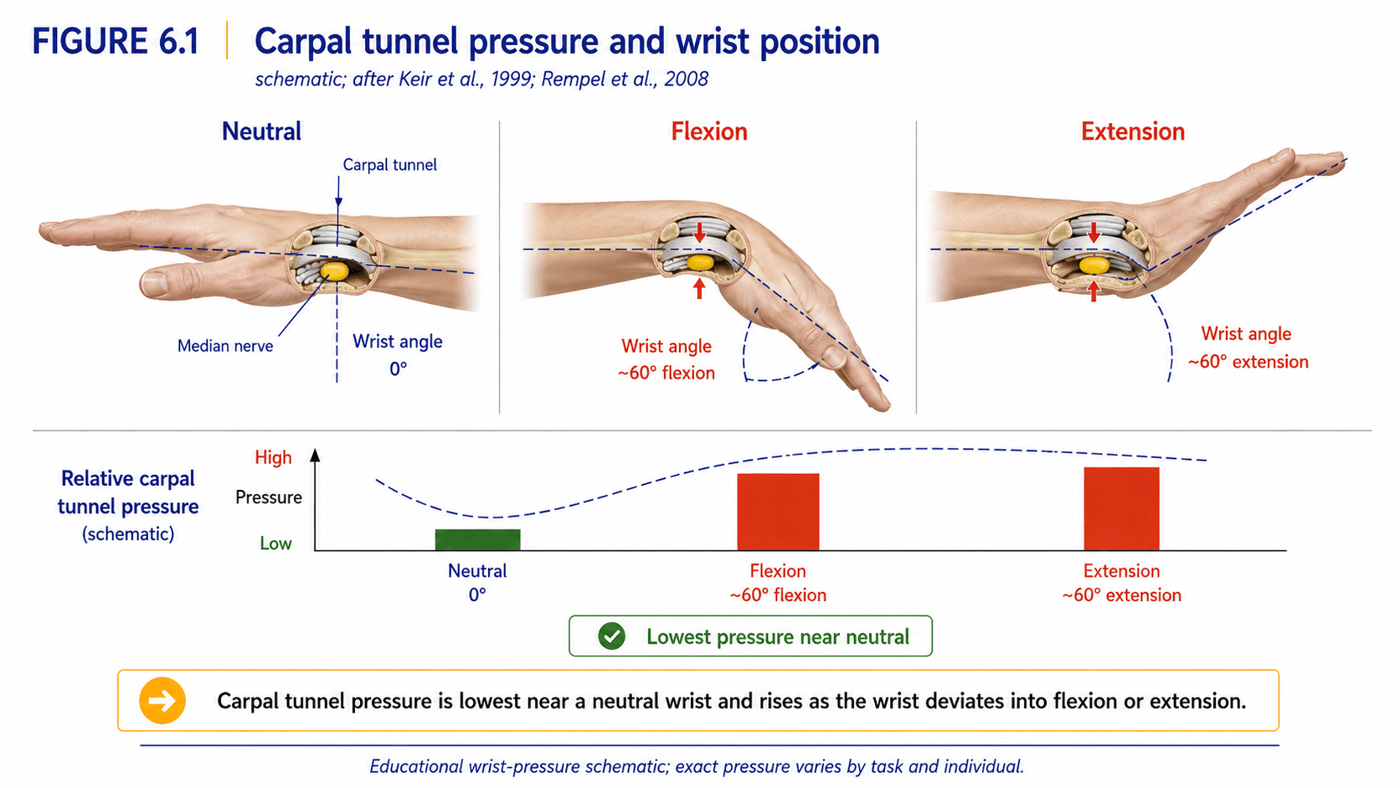
The practical message is straightforward: a wrist worked for hours in a markedly extended or flexed position spends those hours under higher internal pressure than one kept near neutral. This does not, by itself, mean such a wrist will be damaged — the body tolerates a great deal — but it identifies a sensible mechanical target, and it explains why keyboard and mouse geometry, the subject of the next section, has a real influence on comfort.
It is worth being precise about what the carpal tunnel is, because the precision dispels some of the fear around it. The tunnel is a narrow passage at the front of the wrist, floored and walled by the small carpal bones and roofed by a tough band of ligament. Through it run the nine tendons that flex the fingers and thumb, and, alongside them, the median nerve. When pressure within this confined space rises and stays high, the median nerve — the most pressure-sensitive occupant — can be affected, producing the numbness, tingling and, in time, weakness of carpal tunnel syndrome, classically in the thumb, index and middle fingers. Understanding the tunnel as a space whose pressure varies with wrist posture, rather than as a structure that typing inevitably wears out, reframes the whole problem in manageable terms.
6.3 Keyboard and Mouse Geometry
If a neutral wrist is the target, then the arrangement of the keyboard and mouse is the lever, because they largely dictate the angle at which the wrist is held. The commonest problem is sustained wrist extension — the hand cocked upward — often produced by a keyboard set too high, by the small flip-out feet that tilt the back of the keyboard up, or by resting the heel of the hand on a wrist rest and pivoting the hand upward from there. Figure 6.2 contrasts a neutral wrist with this common extended position.
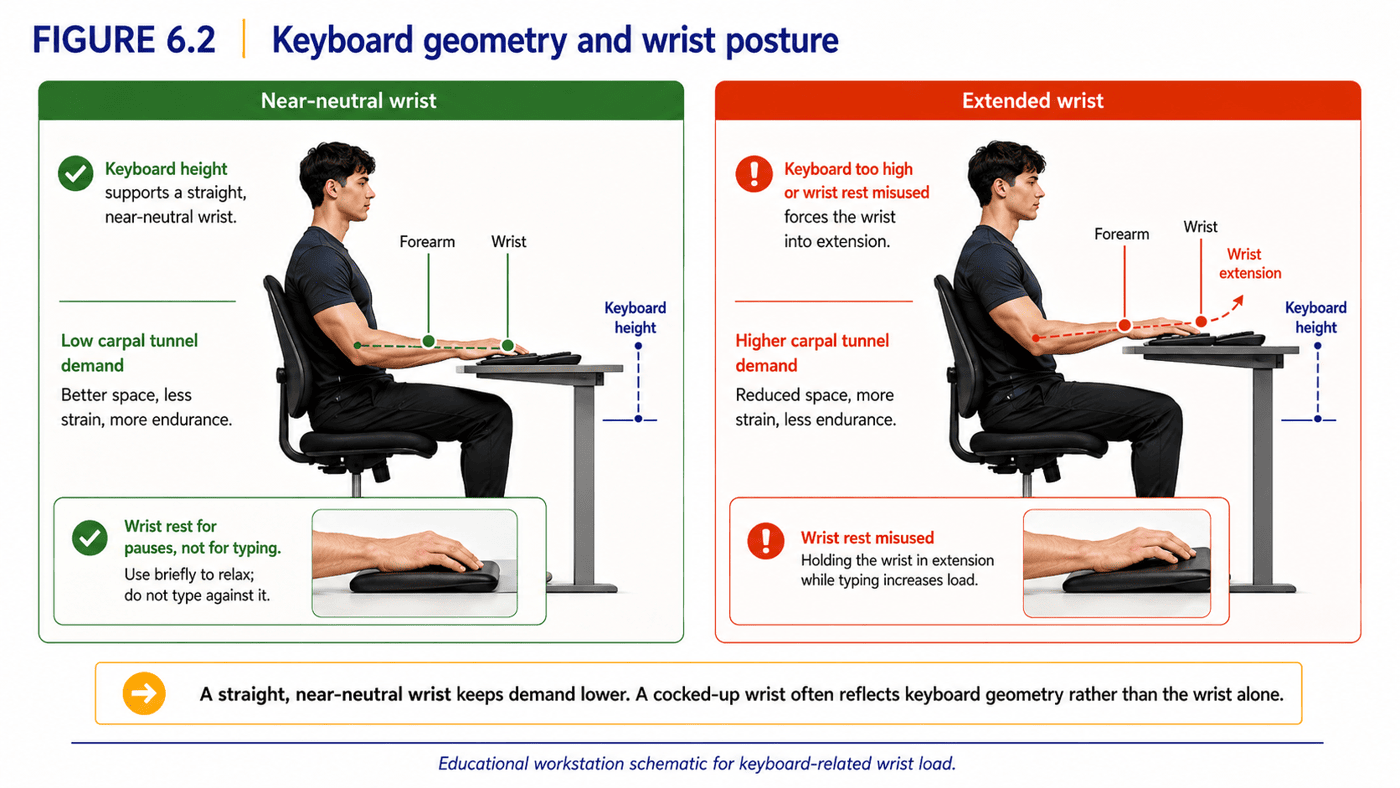
The corrections follow directly from the geometry. The keyboard should sit low enough and flat enough that the forearms and wrists stay roughly straight — often this means keeping the keyboard’s feet down rather than up, contrary to habit. A wrist rest is best used to support the heel of the hand during pauses, not as a pivot to lever the hand upward while typing. The mouse should sit close, at the same level as the keyboard, so the arm does not reach forward or out to reach it. As with the screen and the chair, the aim is not a single rigid ‘correct’ hand position but the removal of the structural drivers of sustained, awkward wrist angles — and, just as importantly, frequent variation, since no position should be held for hours.
The hidden cost of gripping
One source of hand and forearm strain hides in plain sight: the simple act of holding the mouse. Gripping, even lightly, is a sustained static contraction of the forearm muscles, and — as Chapter 1’s account of continuously recruited fibres predicts — a low-level grip held for hours quietly fatigues the very muscles that also work the fingers. Many people grip far harder than the task requires, bracing a small or ill-fitting mouse, or pinching a stylus or pen with needless force.
The remedy is awareness and variation rather than effort. A mouse that fits the hand and supports it, a deliberately relaxed grip, and the habit of fully letting go during the micro-pauses discussed below all reduce this static load. The principle is the same one that runs through the whole book: it is the unbroken holding, not the force of any single action, that accumulates — and the cure is to interrupt and vary it, not to grip more carefully forever.
| Setup factor | The problem it creates | Better arrangement |
|---|---|---|
| Keyboard too high / tilted up | Sustained wrist extension, raised pressure | Lower, flatter keyboard; feet down |
| Mouse placed far away | Forward/outward reach; shoulder & wrist load | Mouse close, level with keyboard |
| Wrist rest used while typing | Pivoting the hand upward into extension | Support the palm during pauses only |
| Gripping a small, hard mouse | Static forearm tension | A mouse that fits the hand; relaxed grip |
| Hours without a pause | Cumulative tendon and nerve load | Frequent micro-pauses and task variety |
Table 6.1. Wrist- and hand-friendly setup removes the drivers of sustained awkward angles and static tension; variation does the rest.
6.4 Repetitive Low-Load Work: The Forearm’s Real Challenge
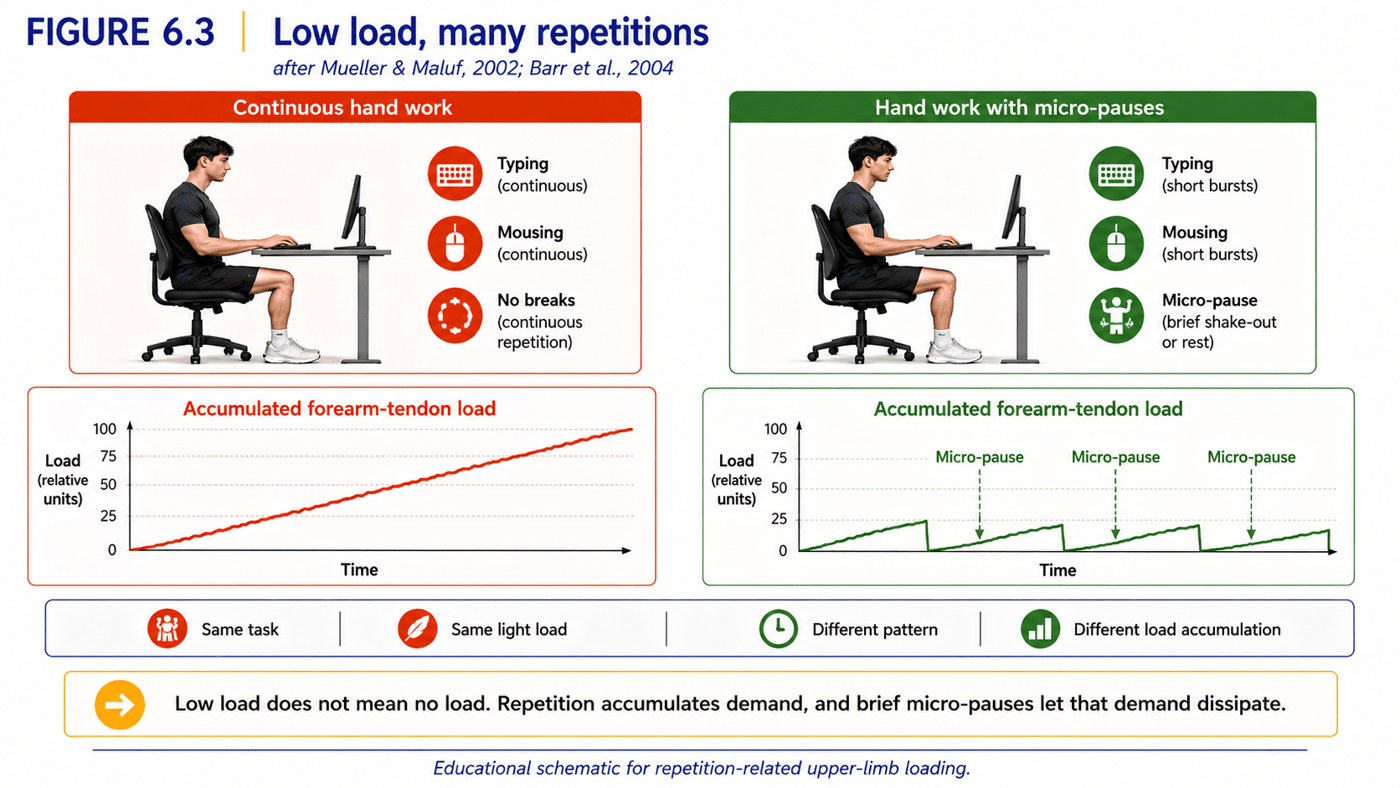
Beyond wrist angle lies the deeper issue of repetition. The muscles that move the fingers sit mostly in the forearm, connected to the fingers by long tendons that run through the wrist. Typing and mousing load these tendons gently but relentlessly, and the forearm muscles that control the hand maintain a low-level contraction for long periods — the same continuously recruited, slow-to-rest pattern met in Chapter 1. Barr, Barbe and Clark (2004), reviewing work-related disorders of the hand and wrist, describe how such repetitive low-load exposure, without adequate recovery, can accumulate into tissue irritation and altered sensorimotor function over time.
Figure 6.3 frames this as a cumulative-load problem. Continuous hand work lets tendon and muscle load build through a session; brief, frequent micro-pauses — a few seconds of letting the hands rest open and relax — allow that load to dissipate before it accumulates. This is the Physical Stress Theory applied to the forearm (Mueller & Maluf, 2002): the tissues can tolerate a great deal of light work, provided it is not unbroken. It is the absence of recovery, far more than the force of any keystroke, that turns ordinary typing into a source of strain. And, as the rest of this book argues, the answer is not to stop using the hands but to vary and interrupt the work, and to build the tissues’ tolerance for it.
The forearm and elbow at the desk
It is worth following the chain one joint up, to the forearm and elbow, which the desk also holds in a fixed posture. Typing and mousing keep the forearm in steady pronation — palm-down rotation — for hours, and the elbow in a fairly constant bend. The muscles that extend the wrist and fingers originate from a small bony prominence on the outer elbow (the lateral epicondyle), and those that flex the wrist from the inner side; sustained, repetitive low-load work transmits its demand to these tendon origins. This is the same mechanism behind the familiar ‘tennis elbow’ (lateral epicondylalgia), which arises far more often from everyday repetitive loading than from tennis.
The practical lesson mirrors the rest of the chapter. The forearm and elbow are not injured by mousing in any single moment; they are loaded monotonously and rarely varied. Interrupting the sustained pronation — turning the palm up, shaking the arm loose, varying the task — and building the tolerance of the forearm muscles over time addresses the demand far better than bracing the elbow or resting it completely. A forearm that is occasionally rotated, moved and loaded fares better than one held palm-down and still for an entire day.
How tendons cope, and how they fail
A word on how tendons actually respond to this repetitive load helps explain why recovery matters so much. Tendons adapt to loading, like every tissue in this book, but they adapt slowly, and they need time between bouts of work to do so. When loading outpaces recovery — too much, too often, too unbroken — the tendon can move along a continuum from healthy, to irritated and reactive, toward longer-term change, a progression described in the influential tendon model of Cook and Purdam (2009). The encouraging half of this picture is that the early, reactive stage is highly responsive to managing load: reduce the unbroken exposure, restore recovery, and rebuild tolerance gradually, and the tendon settles. The discouraging way to treat it is the instinctive one — to push through unbroken, or to rest completely and then return to the same unmodified load. Tendons reward patient, varied, progressive use.
6.5 The Truth About Typing and Carpal Tunnel Syndrome
Few beliefs about office health are as firmly held, or as poorly supported, as the idea that typing causes carpal tunnel syndrome (CTS). CTS is a real and sometimes serious condition — a compression of the median nerve at the wrist, producing numbness, tingling and weakness — and it is reasonably common in the general population, affecting in the order of a few per cent of adults (Atroshi et al., 1999). But its strong association with computer use is largely a myth.
The evidence is unusually clear on this point. Andersen et al. (2003), in a prospective study of several thousand computer workers, found no clinically important association between computer use and the development of CTS. Thomsen, Gerr and Atroshi (2008), in a systematic review of the literature on computer-mouse and keyboard use, concluded that the epidemiological evidence does not support a causal relationship between computer work and CTS. CTS has well-established risk factors — among them obesity, diabetes, thyroid disease, pregnancy and a genetically narrower carpal tunnel — that have little to do with keyboards. This does not mean computer users never experience hand and wrist symptoms; as Gerr et al. (2002) showed, such symptoms are common. It means that those symptoms are usually not CTS caused by typing, and that the widespread fear of ‘giving yourself carpal tunnel’ at the keyboard is not well founded.
This matters for the same reason the ‘text neck’ correction mattered in Chapter 4. A person convinced that ordinary typing is damaging their nerves is primed for exactly the fear, vigilance and avoidance that, as Chapter 3 explained, tend to worsen and prolong symptoms. The accurate message is more reassuring and more useful: most desk-related hand discomfort is a manageable matter of wrist posture, repetitive load and recovery — not an inexorable march toward nerve damage.
It is worth saying a word about the older umbrella term repetitive strain injury (RSI), still widely used for desk-related arm complaints. As a label it is broad and imprecise, gathering together many different conditions — tendon irritations, nerve sensitivities, muscular aches — under a single name that implies a single mechanism, ‘injury from repetition’. That implication can mislead in two ways: it suggests structural damage where often there is none, and it casts repetition itself as the enemy. The mechanically accurate picture is the one this chapter has built — wrist posture, sustained static load, inadequate recovery and nerve mobility, set within the whole arm chain. ‘RSI’ is best treated as a loose description of a problem to be analysed, not as a diagnosis or an instruction to stop using the hands.
6.6 Nerves Are Moving Parts
One element of arm comfort is routinely overlooked: the nerves themselves are mobile structures that must slide and glide as the joints move. The median nerve travels from the neck, down the arm, through the carpal tunnel at the wrist and into the hand; the ulnar nerve runs a parallel course and passes through the cubital tunnel at the inner elbow — the spot that produces the ‘funny bone’ sensation when knocked. As the shoulder, elbow and wrist move, these nerves are designed to glide smoothly along their paths, as Figure 6.4 illustrates. Coppieters and Butler (2008) detailed how this neural movement can be encouraged through specific ‘gliding’ techniques.
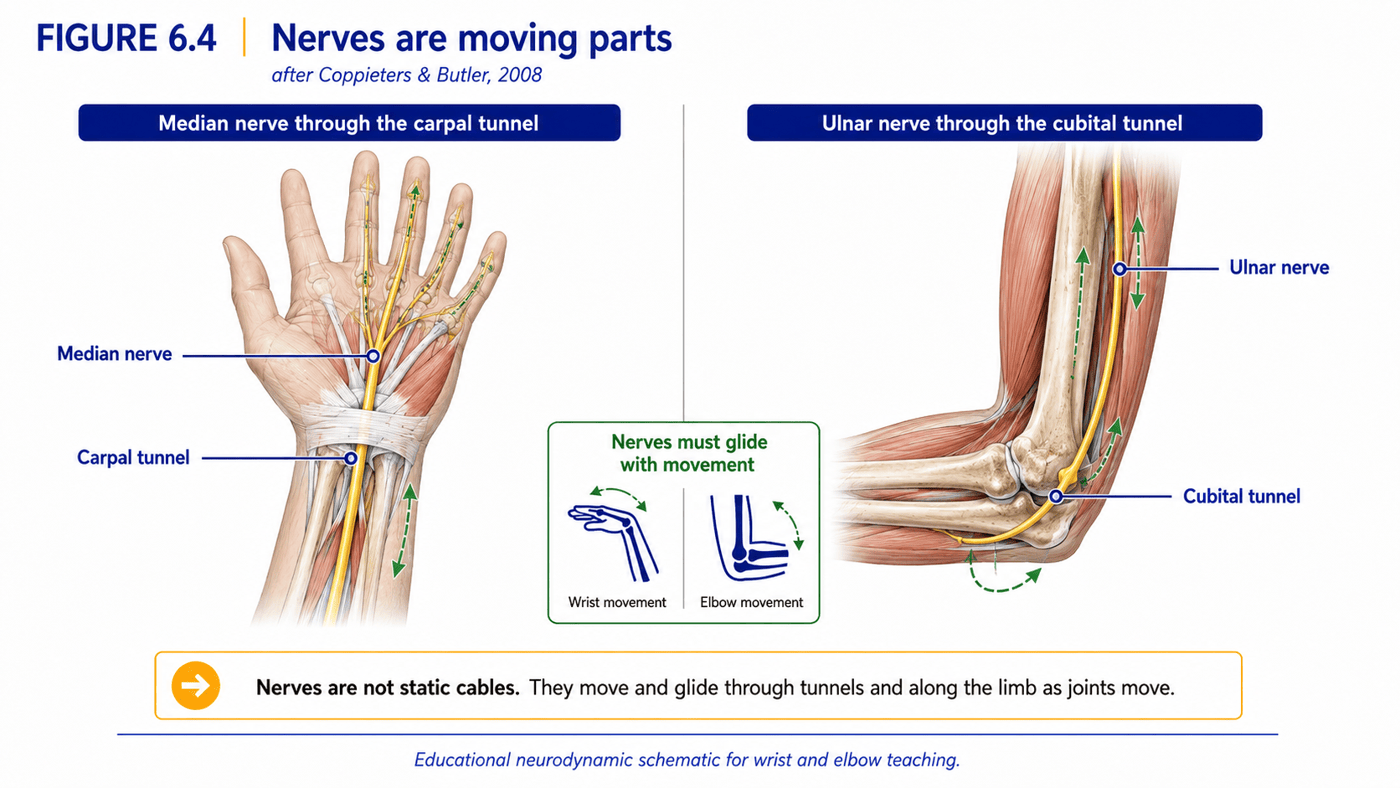
Sustained postures and unvaried repetitive work can compromise this gliding. A wrist held in extension, an elbow held in deep flexion for hours (as when cradling a phone or resting the chin on the hand), or a forward-head, rounded-shoulder posture that loads the nerves further up the chain can all reduce the freedom with which the nerves move — contributing to the tingling and aching that desk workers often describe. The constructive implication is gentle and reassuring: because nerves respond to movement, restoring their mobility is largely a matter of moving the arm through varied positions and avoiding prolonged extremes — not of immobilising or protecting the limb. Nerves, like every other tissue in this book, prefer movement to stillness.
There is a further idea worth knowing, because it ties the whole arm chain together: the double-crush concept (Upton & McComas, 1973). A nerve that is mildly compromised at one point along its course — say, where it exits the neck — may become more vulnerable to a second, minor compression further down, at the elbow or wrist, so that two small irritations combine to produce symptoms that neither would cause alone. Although the concept has been debated, it captures an important clinical reality: arm symptoms cannot always be pinned to a single site. A forward-head, rounded-shoulder posture that loads the nerve high in the chain can make the same nerve more sensitive at the wrist, which is one more reason to treat the neck, shoulder and arm as one connected system rather than as separate parts.
6.7 The Whole-Arm Chain
A final, unifying point ties this chapter to the two before it. The hand is the end of a chain that begins at the neck. The nerves that serve the hand emerge from the cervical spine; the muscles that position the arm originate on the shoulder blade and trunk; the forearm hangs from the elbow, which hangs from the shoulder. Symptoms felt in the wrist and hand are therefore not always wrist-and-hand problems. A forward-head posture that loads the cervical nerve roots, or a rounded shoulder that alters the mechanics of the whole arm, can contribute to sensations experienced far down the limb.
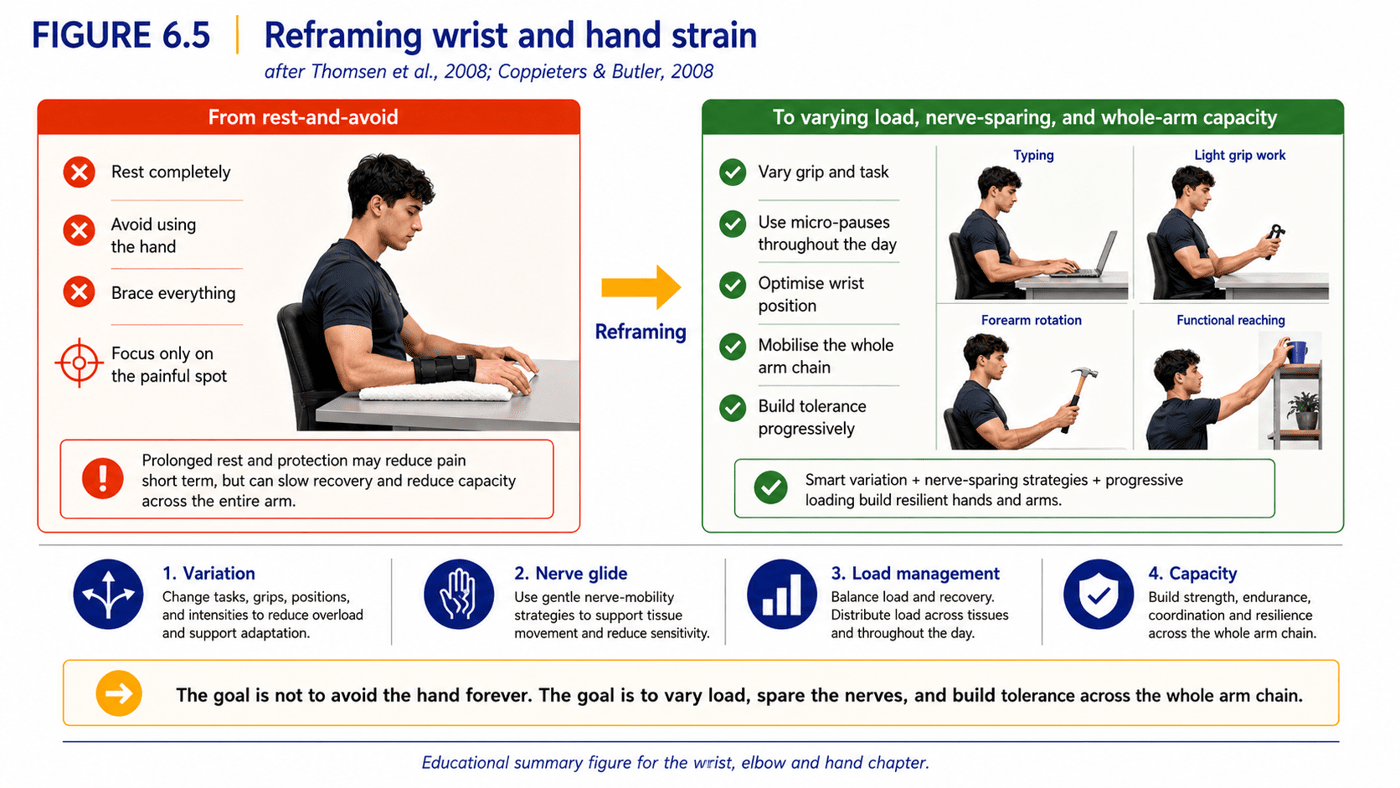
This is why treating the wrist in isolation — a brace here, a stretch there — so often disappoints, and why the strategy of this chapter is deliberately broad. Figure 6.5 sets the old framing against the new. The desk hand is not a fragile structure to be rested and protected against the damage of typing; it is the end of an arm chain to be kept moving, varied and progressively conditioned, with the wrist near neutral, the work frequently interrupted, the nerves gliding freely, and the neck and shoulder above it healthy and well-controlled. The practical routines of Parts VI and VII build this out; the box below gives the essentials.
A familiar pattern shows the chain in action. Consider a desk worker with tingling in the hand who has tried a wrist brace, a new mouse and a course of rest, with little lasting benefit. Read as a whole-chain problem, the picture often makes more sense: a forward head and rounded shoulders loading the nerves high up, a forearm held palm-down and still all day, a wrist worked in extension, and almost no movement to keep the nerves gliding. No single local fix could resolve that, because no single site was the whole problem. Addressing the chain — neck, shoulder, forearm, wrist and, above all, the lack of movement — is what changes the picture.
| Common hand-strain claim | What the evidence and mechanics suggest |
|---|---|
| Typing gives you carpal tunnel | High-quality studies find little causal link; CTS risk is mostly metabolic, hormonal and anatomical (Andersen et al., 2003; Thomsen et al., 2008). |
| Rest the hand until it settles | Prolonged rest deconditions; varied movement and graded load usually serve better (Physical Stress Theory: Mueller & Maluf, 2002). |
| It’s purely a wrist problem | The hand is the end of a chain from the neck; shoulder and neck posture can contribute (Coppieters & Butler, 2008). |
| The keyboard alone is to blame | Wrist angle, repetition, recovery and the whole arm chain all matter — not one product. |
Table 6.2. Common wrist-and-hand claims set against current evidence and mechanical reasoning.
In summary
- The hands do low-force, high-repetition work for long unbroken periods — the Physical Stress Theory in miniature, where light load accumulates without recovery (Gerr et al., 2002; Barr et al., 2004).
- Carpal tunnel pressure is lowest near a neutral wrist and rises with flexion or extension; keeping the wrist near neutral is the clearest mechanical target (Keir et al., 1999; Rempel et al., 2008).
- Keyboard and mouse geometry largely set wrist angle; a lower, flatter keyboard and a close, level mouse keep the wrist neutral, and variation does the rest.
- Repetitive low-load work is best managed by frequent micro-pauses that let tissue load dissipate — it is the absence of recovery, not the force, that strains.
- Typing is not a major cause of carpal tunnel syndrome; high-quality evidence finds little causal link, and CTS risk is largely metabolic, hormonal and anatomical (Andersen et al., 2003; Thomsen et al., 2008).
- Nerves must glide as the arm moves, and the hand is the end of a chain from the neck; manage the whole chain, keep the nerves mobile, and build tolerance rather than resting and protecting (Coppieters & Butler, 2008).
References
Cook, J. L., & Purdam, C. R. (2009). Is tendon pathology a continuum? A pathology model to explain the clinical presentation of load-induced tendinopathy. British Journal of Sports Medicine, 43(6), 409–416.
Upton, A. R. M., & McComas, A. J. (1973). The double crush in nerve-entrapment syndromes. The Lancet, 302(7825), 359–362.
Andersen, J. H., Thomsen, J. F., Overgaard, E., Lassen, C. F., Brandt, L. P. A., Vilstrup, I., Kryger, A. I., & Mikkelsen, S. (2003). Computer use and carpal tunnel syndrome: A 1-year follow-up study. JAMA, 289(22), 2963–2969.
Atroshi, I., Gummesson, C., Johnsson, R., Ornstein, E., Ranstam, J., & Rosen, I. (1999). Prevalence of carpal tunnel syndrome in a general population. JAMA, 282(2), 153–158.
Barr, A. E., Barbe, M. F., & Clark, B. D. (2004). Work-related musculoskeletal disorders of the hand and wrist: Epidemiology, pathophysiology, and sensorimotor changes. Journal of Orthopaedic & Sports Physical Therapy, 34(10), 610–627.
Coppieters, M. W., & Butler, D. S. (2008). Do ‘sliders’ slide and ‘tensioners’ tension? An analysis of neurodynamic techniques and considerations regarding their application. Manual Therapy, 13(3), 213–221.
Gerr, F., Marcus, M., Ensor, C., Kleinbaum, D., Cohen, S., Edwards, A., … Monteilh, C. (2002). A prospective study of computer users: I. Study design and incidence of musculoskeletal symptoms and disorders. American Journal of Industrial Medicine, 41(4), 221–235.
Keir, P. J., Bach, J. M., & Rempel, D. (1999). Effects of computer mouse design and task on carpal tunnel pressure. Ergonomics, 42(10), 1350–1360.
Mueller, M. J., & Maluf, K. S. (2002). Tissue adaptation to physical stress: A proposed “physical stress theory” to guide physical therapist practice, education, and research. Physical Therapy, 82(4), 383–403.
Rempel, D., Keir, P. J., & Bach, J. M. (2008). Effect of wrist posture on carpal tunnel pressure while typing. Journal of Orthopaedic Research, 26(9), 1269–1273.
Thomsen, J. F., Gerr, F., & Atroshi, I. (2008). Carpal tunnel syndrome and the use of computer mouse and keyboard: A systematic review. BMC Musculoskeletal Disorders, 9, 134.
Werner, R. A., & Andary, M. (2002). Carpal tunnel syndrome: Pathophysiology and clinical neurophysiology. Clinical Neurophysiology, 113(9), 1373–1381.